

What’s the best email marketing platform in 2026? Honestly, it depends on who you are. So I lined up the three tools people keep asking about: GetResponse, EmailOctopus, and Kit (the platform you might still know as ConvertKit).
These three look similar from the outside. They all send emails, build forms, and promise automation. But they are built for completely different people. Pick the wrong one and you either overpay for features you never touch, or you outgrow the tool in three months and have to migrate your whole list. Both hurt.
Below is the honest version of each one: the good, the annoying, and who it’s actually right for. Prices move around a lot in this category, so treat every number here as a starting point and confirm it on the official pricing page before you pay.
What Is the Best Email Marketing Platform in 2026?
Here’s the short answer before the detail.
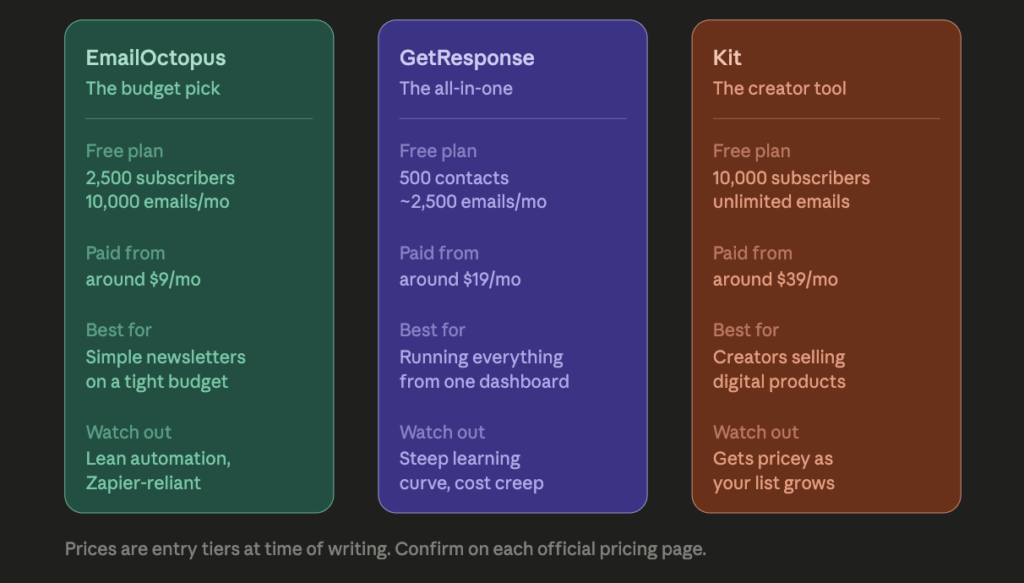
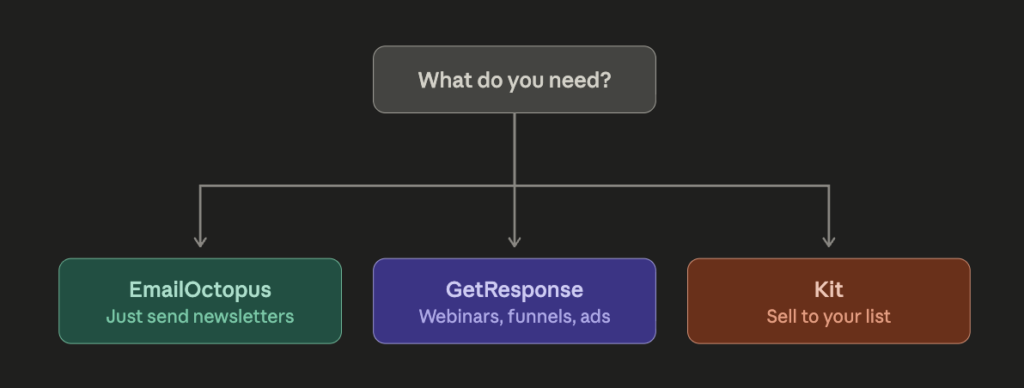
EmailOctopus is the budget pick. It sends clean newsletters cheaply and does very little else.
GetResponse is the all-in-one. Email, automation, landing pages, webinars, courses, and ads under one login, with a learning curve to match.
Kit is the creator tool. Huge free tier, built-in selling, and the steepest price curve of the three once your list grows.
EmailOctopus: The Budget Pick for Simple Newsletters
EmailOctopus is the easiest of the three to understand, because it deliberately does one job. It sends email, and it sends it cheaply.
The free plan covers up to 2,500 subscribers and 10,000 emails a month, which is genuinely useful rather than a demo. Paid plans start at roughly $9 to $10 a month for a 500-subscriber tier and scale with your list size, with send limits set at around ten times your subscriber count. There’s one paid tier structure, no confusing feature ladders.
What it does well. It’s cheap, and it stays cheap as your list grows. The interface is simple enough that if you can use Gmail, you can send a campaign in ten minutes. Deliverability is solid because the platform is built on Amazon’s sending infrastructure, and most reviews single out the support team for being fast and human.
Where it falls short. The feature set is lean by design. Automation handles welcome emails and basic drip sequences, and that’s about the ceiling. On the free plan, your reporting history only goes back 30 days and your emails carry EmailOctopus branding. A good chunk of its integrations run through Zapier rather than being native, so depending on your stack you may need that middle layer. Support is generally praised, though a minority of users report accounts being reviewed or paused without much warning, which is worth knowing before you migrate a big list.
EmailOctopus suits the person who wants to send a good newsletter without paying premium prices for tools they’ll never open. If you’re still figuring out which tools belong in your stack at all, our guide to essential software for creators and online business owners is a decent starting point.
Ready to try it? Start with EmailOctopus free
GetResponse: The All-in-One Marketing Platform
GetResponse sits at the opposite end of the spectrum. Where EmailOctopus does one thing, GetResponse tries to do everything: email, marketing automation, landing pages, webinars, a website builder, a course creator, AI writing tools, and even Meta and Google ad management.
The free plan is capped at 500 contacts and around 2,500 emails a month, with a short window of premium access when you first sign up. Paid plans generally start around $19 a month for 1,000 contacts on the entry tier, with the automation-heavy tier closer to $59 and the creator/monetization tier around $69 at the same list size. Annual billing knocks off a meaningful chunk, and nonprofits get a steep discount.
What it does well. You’re not just sending emails. You’re running webinars, building funnels, tagging and scoring contacts, and automating customer journeys from one dashboard. The visual workflow builder is the standout feature and gets consistently good reviews. Even the entry plan includes unlimited email sends, which plenty of competitors cap.
Where it falls short. Complexity. If you’re brand new to email, all that surface area feels heavy, and there’s a real learning curve before you get value out of it. Users also flag the email editor as occasionally clunky and the webinar tools as inconsistent. Cost climbs steadily with list size, and some of the tier limits feel arbitrary. There’s also a habit of gating one feature you want behind the plan above the one you need, so price out your real contact count and your real feature list before you commit.
GetResponse is for the person who wants their whole operation running from one login and doesn’t mind climbing a learning curve to get there. If you’re weighing that trade-off across your whole toolset, we cover the same tension in choosing better software for your business needs.
Want the full suite? Try GetResponse free
Kit (Formerly ConvertKit): Built for Creators Who Sell
Kit is the creator’s tool. It’s aimed squarely at bloggers, podcasters, course sellers, and newsletter writers, and it has one number that turns heads: the free Newsletter plan supports up to 10,000 subscribers with unlimited email sends. That’s the most generous free tier of anything here.
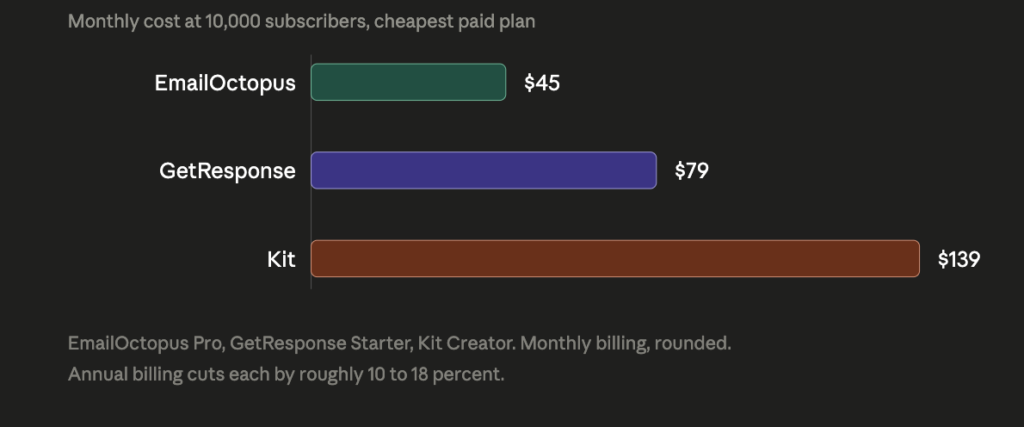
Paid plans start around $39 a month for 1,000 subscribers (closer to $33 on annual billing), with the Pro tier starting near $79. Prices scale by subscriber count, and at 10,000 subscribers the main paid plan lands around $139 a month.
What it does well. The free tier is a real product, not a trial. Deliverability is trusted by creators who live and die by their open rates. The visual automations are powerful without being intimidating. And Kit has commerce built in, so you can sell digital products and paid subscriptions without bolting on a separate checkout, plus a creator network for growth and free migration help if you’re switching from another tool.
Where you need to be careful. Price is the number one complaint from real users, and it’s loud. Kit raised prices substantially in late 2025, roughly doubling the entry paid tier, and the subscriber-based curve punishes creators who grow an audience faster than they monetize it. The free plan is generous on subscribers but thin on features: one automation, one sequence, Kit branding on your emails and forms, and no third-party integrations. Selling through Kit carries a fee of about 3.5% plus $0.30 per transaction, which is competitive with standalone checkout tools but still needs to go into your margins. And a quirky but real gripe: some creators report their newsletters rendering badly in dark mode, so test before you send.
Kit is a strong choice if you’re a creator who will actually use the built-in selling. If you won’t, you’re paying premium rates for a newsletter tool.
Start free with Kit: Create your Kit account
GetResponse vs EmailOctopus vs Kit: Side by Side
| EmailOctopus | GetResponse | Kit (ConvertKit) | |
|---|---|---|---|
| Best for | Simple, cheap newsletters | Running a whole business from one dashboard | Creators who sell digital products |
| Free plan | 2,500 subscribers, 10,000 emails/mo | 500 contacts, ~2,500 emails/mo | 10,000 subscribers, unlimited emails |
| Paid entry price | ~$9–$10/mo | ~$19/mo (1,000 contacts) | ~$39/mo (1,000 subscribers) |
| Automation depth | Basic sequences | Deep, visual, branching | Strong visual automations |
| Built-in selling | No | Yes (courses, paid newsletters) | Yes (3.5% + $0.30 per sale) |
| Learning curve | Very low | Steep | Moderate |
| Main drawback | Lean features | Complexity and cost creep | Gets expensive as your list grows |
All figures reflect published pricing at the time of writing. Check the official pages before you buy, because every one of these platforms has changed its numbers in the last 18 months.
How to Choose the Best Email Marketing Platform for You
Most people pick a platform by comparing feature lists, then regret it. A better approach is to answer three questions: how big is your list going to be in a year, will you sell products directly through your emails, and how much time are you willing to spend learning software.
The Best Email Marketing Platform for Beginners on a Budget
EmailOctopus. It’s cheap, it’s clean, support is quick, and you’ll be sending your first campaign the same afternoon. If your plan is a weekly newsletter and nothing more exotic, paying triple for automation you’ll never build makes no sense.
The Best Email Marketing Platform for All-in-One Marketing
GetResponse. If you want webinars, landing pages, funnels, and ad management from one login instead of stitching five tools together with Zapier, this is the most complete option here. Budget time for the learning curve.
The Best Email Marketing Platform for Creators Who Sell
Kit. The 10,000-subscriber free tier gets you off the ground for nothing, and the built-in commerce means you can sell an ebook or a paid newsletter without a separate checkout. Go in with your eyes open about the price at 5,000 and 10,000 subscribers, because that’s where people start complaining.
One thing that applies whichever you pick: your legal obligations follow you across platforms. Accurate sender information, honest subject lines, a working unsubscribe link, and a real postal address are all required for commercial email in the US under the FTC’s CAN-SPAM rules. All three tools handle the mechanics for you, but the responsibility is yours.
Frequently Asked Questions
Which email marketing platform is best for beginners?
EmailOctopus for simplicity and price, or Kit if you expect to build a large list quickly and want a free plan that won’t cut you off at 500 subscribers.
What’s the best free email marketing platform?
Kit, on raw numbers. Up to 10,000 subscribers with unlimited sends beats everything else here. The catch is the feature limits: one automation, one sequence, Kit branding, and no integrations. EmailOctopus offers a smaller free tier with fewer strings attached.
Is GetResponse better than Kit?
It’s more complete. Whether that makes it better depends on whether you need webinars, funnels, and ads. A creator selling a course to a newsletter list will usually be happier on Kit. A small business running several marketing channels will get more from GetResponse.
Can I switch platforms later?
Yes, and most tools will help you. Kit offers free migration for new paid customers. Migration is still a real chore, though, which is the whole reason it’s worth thinking about where your list will be in a year rather than where it is today.
If you’re building out the rest of your stack around whichever tool you pick, we’ve written more on choosing better software to build smarter online and on how to maximize your online business potential with the right tools.
Affiliate disclosure: This post contains affiliate links. If you sign up through one of them, we may earn a commission at no extra cost to you. We only recommend tools we believe are worth your money, and our opinions on their strengths and weaknesses are our own.