

Most people trying to get website clients do the same thing. They build a portfolio, post it online, and wait. Referrals trickle in, months pass, and the inbox stays quiet.
There’s a quicker path. You go find the business owners who already need a website, and you reach out first.
This guide covers a two-step system you can set up in an afternoon, even with zero clients and no portfolio. Step one, you build a list of local businesses. Step two, you load that list into a CRM that texts them and follows up for you, on a schedule, until someone replies. Then you hop on a quick call and show them a site.
Let’s build it.
How to Get Website Clients Without a Portfolio or Ads
When you’re starting out, the slow methods feel safe. Post on social, add work to a portfolio, hope a referral shows up. The catch is that all of these wait on other people to find you.
Cold outreach flips that. You pick the businesses you want, you contact them directly, and you control how many you reach each day. Most of the guides that rank for how to get web design clients agree on this point: reaching out first is the fastest way to land your early projects. You don’t need followers or an ad budget. You need a clean list and a message worth replying to.
Two tools do the heavy lifting. A Google Maps scraper to build the list, and GoHighLevel to send and manage the outreach. If you’re still picking your stack, our guide to choosing better software for your business needs can help you decide what’s worth paying for.
Step 1: Build a List of Local Business Owners
Open Google Maps and search a business type in a city. Landscapers, roofers, dentists, whatever you want to work with. Now use a free Google Maps scraper extension like TrySmartScraper. Click extract, and it scrolls through the listings and drops the names, phone numbers, and websites into a spreadsheet for you.
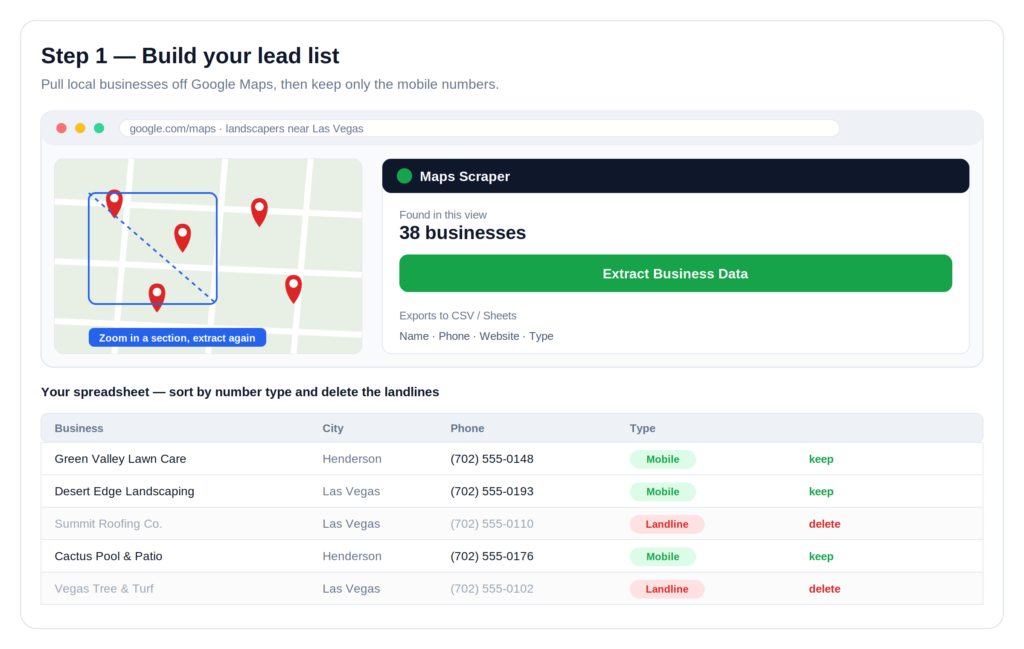
Google only shows so many results per search, so here’s the trick. Zoom into one part of the city and run the extract again. New businesses show up. Zoom into a few more areas and you can pull hundreds of businesses out of one city.
Now the part that decides whether this works. You want mobile numbers, not landlines. A cell number almost always reaches the owner directly. Sort your spreadsheet by number type and delete every landline. What’s left is a list of owners you can actually get to.
One honest note on the tool. Free Maps scrapers cap how many rows and data fields you can export, and they pull fewer details than the paid ones. For a first campaign the free version is plenty. If you scale up later, a paid scraper may be worth it.
Step 2: Set Up the Outreach Workflow in GoHighLevel
Take that clean list and import it into GoHighLevel. Go to Contacts, click Import, and drop in your file. Then turn on the workflow that handles the follow-up for you.
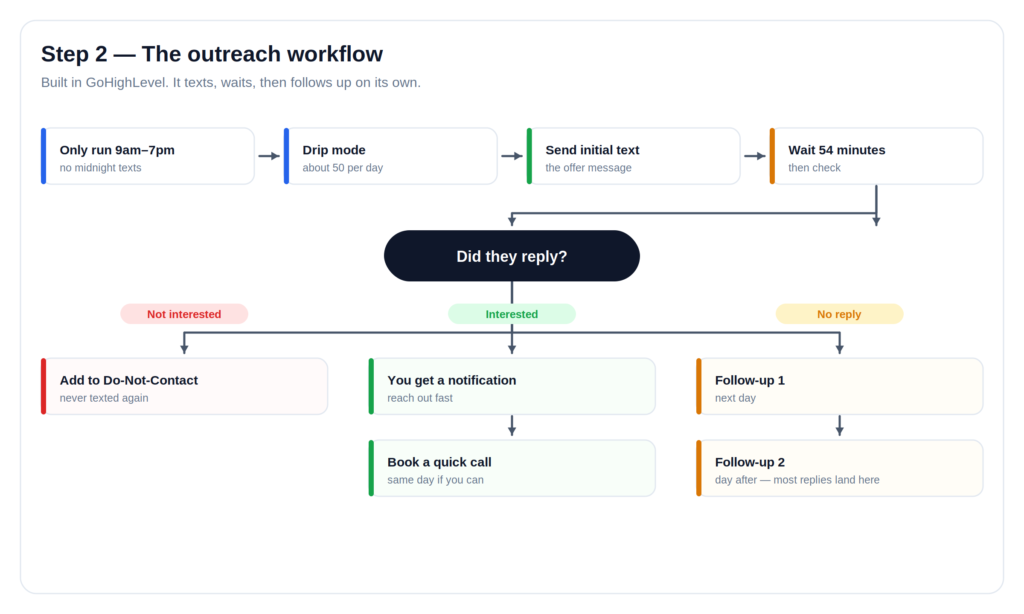
A good workflow does four things on its own. It only sends during daytime hours, so you never text someone at midnight. It drips messages out slowly, around fifty a day, so your number stays in good standing. It sends the first text, waits under an hour, then checks for a reply. From there it splits three ways.
If someone says they’re not interested, they go on a do-not-contact list and never get another text. If someone sounds interested, you get a notification to reach out. If they don’t reply at all, the system waits a day and sends a follow-up, then another the day after. Most replies come from those follow-ups, not the first text.
Here’s the cost picture, honestly. GoHighLevel’s standard free trial is 14 days, and some partner links stretch it to 30. After the trial, the Starter plan runs about $97 a month, and texting is billed on top based on how much you send. Sign up through the link below and the full workflow, messages and follow-ups included, imports straight into your account, so you’re not building it from scratch.
👉 Start your free GoHighLevel trial and import the workflow
Not sure GoHighLevel is your fit? Our roundup of essential software for creators and online business owners walks through a few options.
The First Text That Actually Gets Replies
The wording matters more than anything else in this system. Here’s the message that does the work:
Hey, this is [your name]. I was looking you guys up on Google and saw you don’t have a website. I know it’s kind of random, but I went ahead and built you one. Want to see it? Just reply STOP if you’d rather I didn’t.
Why it works: you’re not pitching. You’re offering to show them something that’s basically done. The opt-out line gives anyone who’s annoyed an easy exit, which keeps your list clean and your number safe.
What to Do When a Business Says Yes
Don’t sit there texting back and forth for an hour. On a reply, your only goal is to book a short call, same day if you can.
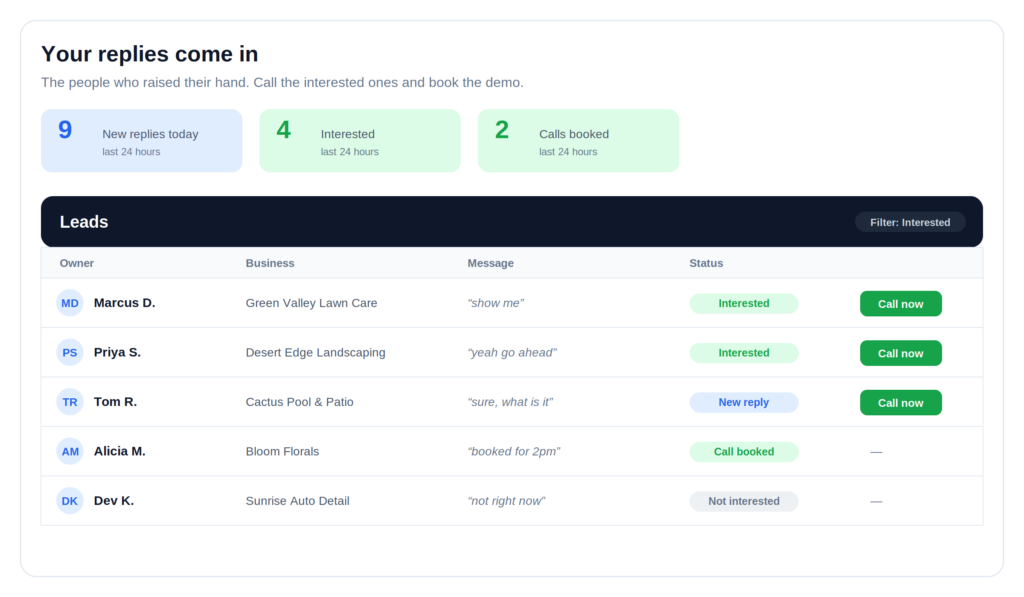
On the call, keep it simple. Show them their Google listing. Show them two or three local competitors who all have sites. Then show them the one you put together for them. It doesn’t have to be perfect. For a business with no site at all, better than nothing wins the deal.
Charge a one-time setup fee plus a small monthly amount for hosting and edits, and you’ve got recurring income instead of a single payday.
What Reply Rates to Actually Expect
Let’s keep the numbers honest. On cold texts, a reply rate of two to four percent is normal. Send a hundred messages and you might get a handful of people who want to see the site. Send fifty a day and the list keeps feeding you conversations.
Here’s the part nobody says out loud. Most people who read this will never send a single text, so they’ll get nothing. The system only pays off if you run it. The work is simple, and it stacks up fast once you start.
Before You Send a Single Text: Cold SMS Rules to Know
This is where honesty matters, because cold texting has real legal strings attached in the US. Under the Telephone Consumer Protection Act (TCPA), sending automated marketing texts to a cell phone without prior consent can carry penalties of roughly $500 to $1,500 per message, and these often turn into class-action cases.
There’s more. Since early 2025, US carriers block business texts that aren’t registered through a system called A2P 10DLC, so you have to register your brand and campaign before your messages will even deliver. You also need to identify yourself in the first text, honor STOP right away, stay inside daytime sending hours, and check whether your state has stricter rules on top of the federal ones.
None of this is legal advice, and it’s not a reason to skip the method. It’s the setup to get right on day one. GoHighLevel walks you through 10DLC registration during onboarding. If you’d rather warm up with a lower-risk channel first, cold email and social DMs carry lighter rules, and you can add texting once you’re registered.
Is This System Right for You?
This fits two kinds of people. If you’re brand new and chasing your first web design client, it puts you in front of owners with no ads, no audience, and no cold calling all day. If you already run an agency, it’s a low-effort way to keep your pipeline full without hiring a sales rep. Same system either way.
If you’re still deciding which tools to build your business on, start with our guide to the right tools for your online business.
Frequently Asked Questions
How do I get website clients with no experience?
Start with local businesses that have no website at all. The bar is low, the need is obvious, and you learn on real projects. Build one simple site, use it as your sample, and reach out to similar businesses.
Does cold texting business owners actually work?
Yes, at a small percentage. Expect two to four percent to reply. That’s enough to stay busy if you send consistently and follow the SMS rules above so your messages get delivered in the first place.
Do I need to know how to code?
No. Most beginner client sites are built on drag-and-drop platforms or templates. You need enough skill to make a clean, mobile-friendly site, and you can pick up the rest on the job. Our guide on building smarter online covers the tools that make it easier.
How much should I charge for a website?
Price for your market and your time. Many beginners charge a one-time setup fee plus a small monthly fee for hosting and updates. The monthly piece is what turns one project into steady income.
Is scraping Google Maps legal?
Pulling publicly listed business info is generally allowed. How you contact people afterward is the part that’s regulated, and the TCPA and 10DLC rules above are what you have to follow once you start reaching out.
Your Next Step
Pick one business type. Build a list of fifty local owners with mobile numbers. Import them, turn on the workflow, and send your first batch this week.
👉 Start your free GoHighLevel trial and load the full outreach workflow
Affiliate disclosure: This post contains affiliate links, including for GoHighLevel. If you start a trial or subscribe through our links, we may earn a commission at no extra cost to you. We only recommend tools we’d use ourselves, and every recommendation reflects our honest opinion.