

Digital products are one of the lowest-risk, highest-margin ways to make money online.
You create something once a course, an ebook, a template, a membership — and you can sell it over and over without printing, shipping, or restocking anything.
But here’s the part most guides skip: the product is rarely the hard part. The selling is. Most digital businesses don’t fail because the product is bad but because the seller never built a simple system to take payments, deliver the file, and follow up.
This guide fixes that. We’ll walk through exactly how to sell digital products online, step by step, and then compare three popular platforms — Skool, Systeme.io, and Learnybox — honestly, pros and cons, so you can pick the one that actually fits where you are right now.
What Counts as a Digital Product?
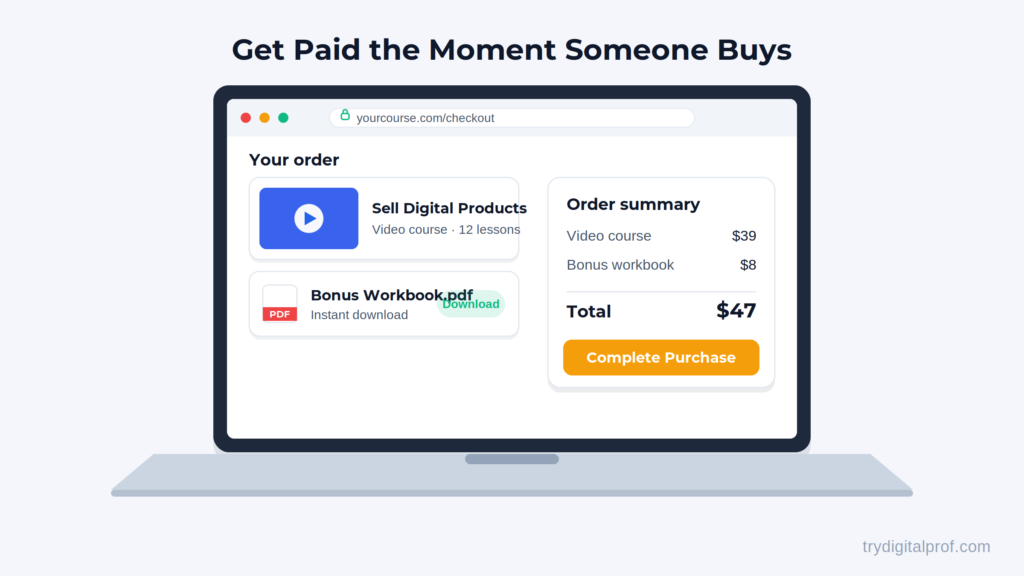
A digital product is any asset you can sell and deliver online without physical inventory. According to Salesforce, digital products let you sell repeatedly “with minimal ongoing effort” once they’re created — which is exactly why margins are so high.
Common examples include:
- Online courses and video lessons
- Ebooks, guides, and PDFs
- Templates (Notion, spreadsheets, Canva, resumes)
- Memberships and paid communities
- Coaching programs and digital workshops
- Stock assets — photos, presets, fonts, audio
If you can save it as a file or deliver it through a login, you can sell it.
If you’re still deciding which tools fit your wider setup, our guide to essential software for creators is a good companion read.
How to Sell Digital Products Online in 5 Steps
You don’t need a developer or a big budget. You need a clear path. Here’s the honest version.
Step 1: Pick a product people already want
The biggest mistake is building first and finding buyers later. Flip it. Look at what your audience already asks you about, or what problems keep them up at night, and turn the solution into a digital product. Start with one product, not ten.
Step 2: Price it on the outcome, not the hours
New sellers almost always underprice. Don’t price the number of pages or video minutes — price the transformation. A $47 template that saves someone five hours a week is a bargain. Many successful sellers use a simple ladder: a low-ticket entry product ($7–$47) to win the first sale, then a flagship offer ($97–$497) for serious buyers.
Step 3: Choose where you’ll sell it
This is the most consequential decision you’ll make, and it’s where the three platforms below come in. You’ll want a place that handles the checkout, delivery, and ideally email follow-up without you duct-taping five tools together.
Step 4: Build a simple sales funnel
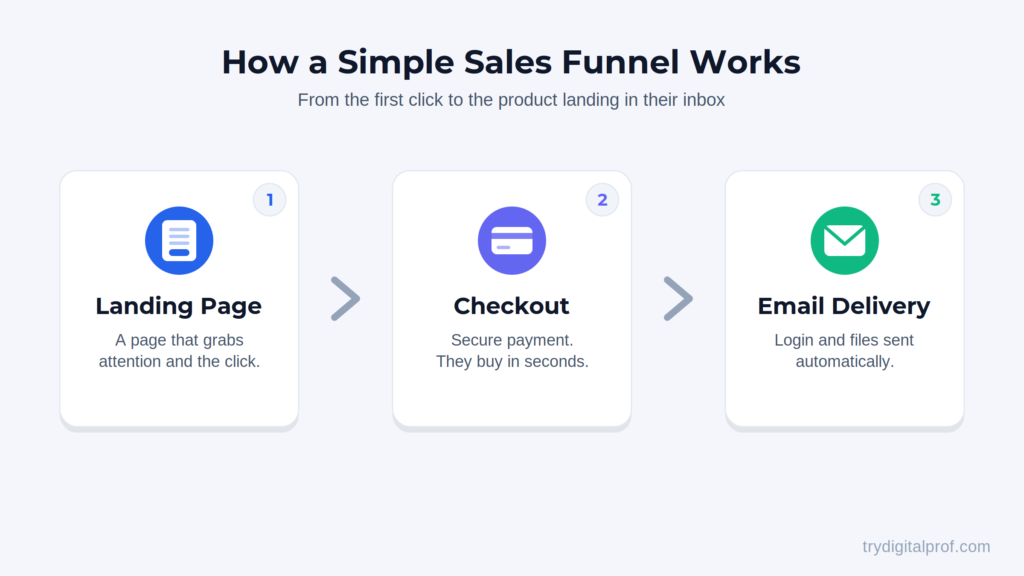
A funnel is just the path from “stranger” to “buyer”: a landing page, a checkout, and a thank-you/delivery page. The magic is automation — someone pays, their account is created, their login goes out by email, and they’re in. No manual work on your end.
Step 5: Drive traffic and follow up
Send people to your offer through email, content, or social media — then follow up. A meaningful share of buyers don’t finish checkout the first time, so an automated reminder email or two recovers real revenue you’d otherwise lose.
For a deeper look at matching tools to your specific goals, see our breakdown on choosing better software for your business needs.
The Best Platforms to Sell Digital Products Online
Here’s where it gets practical. These three tools come up constantly — but they’re not the same kind of tool, and that’s the key insight most comparisons miss.
Think of it as three buckets:
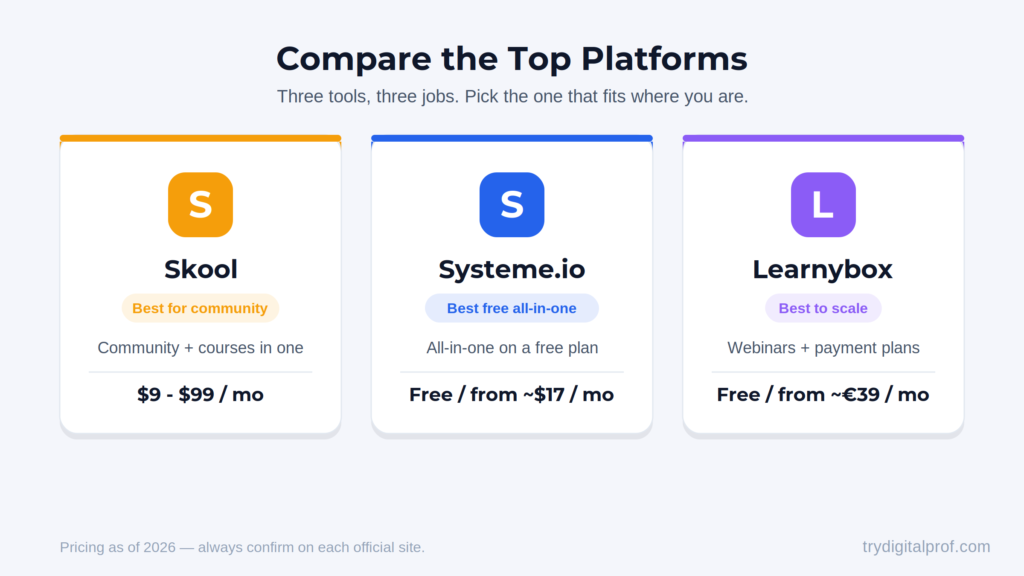
- Skool is a community-first platform. Its whole soul is engagement.
- Systeme.io is the budget all-in-one — the cheapest way to get selling.
- Learnybox is the most complete all-in-one — the fuller toolkit for scaling.
The good news: all three let you start for free. Let’s go through each, warts and all.
Skool — Best for Community & Engagement
Skool is ridiculously simple. People report having a community live within an hour. You get a clean Facebook-group-style feed, a basic course area, and an events calendar — and the secret weapon: gamification. Points, levels, leaderboards, and badges that keep members showing up. Engaged members don’t cancel, and that’s real money over time. It also has a discovery directory that can send you free members and a mobile app people actually use.
The honest downsides: Skool is not an all-in-one. There’s no built-in email marketing, no funnel builder, and no website builder. It doesn’t even host your videos — you embed them from YouTube or Vimeo. And the fees matter: Skool’s Hobby plan runs about $9/month but takes a 10% cut of every payment, while the Pro plan is around $99/month with the fee dropping to roughly 2.9%. On real revenue, the “cheap” plan is often the expensive one. There’s no permanent free plan, but there is a 14-day free trial. (Confirm current rates on Skool’s official pricing page, as fees change.)
Bottom line: A brilliant engagement machine — but you’ll need to bring your own email and selling tools.
Systeme.io — Best Free Way to Start Selling Digital Products Online
For beginners on a budget, Systeme.io is special. It’s a true all-in-one, and its free plan may be the most generous in this entire space — permanent, no credit card, no timer. You get around 2,000 contacts, 3 sales funnels, an online course, a blog, unlimited email sends, and 0% transaction fees. The platform never takes a cut of your sales, on any plan.
When you do upgrade, paid plans start at roughly $17/month — less than many tools charge for email alone. The funnel-to-email-to-course chain is the real magic: someone buys, their course account is created automatically, and login details go out by email. No duct tape.
The honest downsides: It’s the least polished of the three. Templates and the page builder get the job done but won’t win design awards. Course features are basic (no certificates, limited gamification), and automation on the free plan is limited. The free plan also shows Systeme.io branding on your pages until you upgrade. (Pricing varies slightly by source — verify on the official page.)
Bottom line: The lowest-risk way to start selling online, full stop.
Learnybox — Best for Scaling a Serious Business
Learnybox is the most complete all-in-one of the three. Everything Systeme.io does, Learnybox does — plus more muscle: a proper course builder, sales funnels with templates, real email automation, and notably native webinars (live or automated replays that sell while you sleep). The checkout handles one-time payments, subscriptions, and installment plans — gold for selling higher-priced courses. It’s the number-one platform in France for a reason.
Its free account is excellent too — no credit card, no time limit, and you can sell up to €1,000 before you ever pay. You can build the whole business and let your first sales fund the tool. Paid plans start at around €39/month (excl. VAT).
The honest downsides: Because it does so much, there’s more to learn — it’s not the “running in an hour” feeling of Skool. And it’s rooted in the French-speaking market, so if you specifically want a huge English-speaking peer community, that’s more Skool’s world. (Check the official site for current plan details.)
Bottom line: The most complete selling machine when you’re ready to build something serious.
Which Platform Should You Choose?
Don’t ask “which tool is best.” Ask two quick questions:
1. Is my product really a community — where the magic is people interacting? If yes → Skool. If no, you want an all-in-one.
2. Am I starting from zero on a shoestring, or building a fuller sales machine? Shoestring → start with Systeme.io’s free plan. Fuller machine → go Learnybox.
Here’s the one-liner to remember:
- Skool keeps people engaged.
- Systeme.io gets you selling for free.
- Learnybox gives you the most complete machine to scale.
Answer those two questions and your choice basically makes itself. For a wider view on picking tools that grow with you, our guide on how to build smarter online digs deeper.
Frequently Asked Questions
How do I get paid when selling digital products?
Each platform connects to a payment processor like Stripe or PayPal. The customer pays, the platform delivers the file or login automatically, and the money lands in your connected account on a regular payout schedule. Note that processors charge their own standard card fees on top of any platform fee.
Can I sell digital products online for free?
Yes — to start. Systeme.io and Learnybox both offer genuine free plans (no credit card), and Skool offers a 14-day free trial. You can validate an idea and even make your first sales before paying anything. You’ll typically upgrade once you outgrow the free limits.
Do I need a website to sell digital products?
Not necessarily. All three platforms can host your sales page, checkout, and product delivery for you. A separate website is a nice-to-have, not a requirement, when you’re getting started.
What’s the easiest digital product to start with?
Low-ticket items like templates, ebooks, or a short mini-course are the easiest first products. They’re quick to create, easy to price, and remove the risk of a buyer’s first purchase — the perfect entry point onto your value ladder.
How much does it cost to sell digital products online?
You can start at $0 on a free plan. As you grow, expect roughly $9–$17/month at the entry level (Skool Hobby or Systeme.io Startup), scaling to $47–$99/month for advanced features like automated webinars. Always confirm current pricing on each tool’s official page before committing.
Final Word: Pick One and Launch
Here’s the honest push — don’t let this turn into another week of researching instead of building.
You now have everything you need to choose. All three tools are free to start, so there’s zero risk in picking the one that fits and getting your product live this week.
The creators who win aren’t the ones who pick the perfect tool. They’re the ones who actually launch.
Want to make sure your whole stack works together? Start with our overview of how to maximize your online business potential with the right tools.
Affiliate Disclosure: TryDigitalProf is reader-supported. Some links in this article are affiliate links, which means we may earn a commission if you make a purchase at no additional cost to you. We only recommend products and tools we believe will genuinely help creators and small business owners. All pricing and features were accurate at the time of writing; please confirm current details on each provider’s official page.